Conversations
Use a conversation for a continuing task: its messages, attachments, generated assets and documents belong together. You must be signed in to use browser chat. The owner can change an ordinary conversation; another signed-in user can read it when the owner enables sharing. Delegated child histories have separate read-only controls.
Choose a model and capabilities

Choose the model from the header before sending a message. The available list is filtered by permissions. Configuration can also expose automatic routes or aliases through the shared model list. Compliance indicators in the picker describe the installation's configured model metadata; they are not a certification produced by AIplane.
The composer offers the effort levels off, low, medium, high and xhigh. A new conversation starts at low, which is enough for most questions; choose a higher level for hard multi-step problems. Higher levels also allow more tool rounds per answer (off 8, low and medium 16, high 32, xhigh 64). The picker lists only the levels the selected model can express — a model that always reasons offers no off — and is disabled when the model has no supported reasoning parameter. It is a model request setting, not a guaranteed response time or quality level.
Select Tools in the composer to inspect capabilities available to this conversation. Search or browse groups and select their state:
| State | Effect |
|---|---|
| Off | Hidden from the assistant for this conversation. Some capabilities cannot be disabled. |
| Automatic | The assistant can enable the capability when the request needs it. |
| Always on | The capability is available without that activation step. |
Changing a conversation's capability state does not grant a capability your account lacks. Removing an active capability badge returns it to Automatic. For account-level switches and external-service consent, see Tools and integrations.
Send, redirect and stop work
When a conversation opens, the cursor is already in the message field, so you can start typing at once. Write text, add any attachments, then press Enter or Send. Shift+Enter inserts a newline. Replies stream into the transcript. You can expand tool-call details to inspect what the assistant did and what the tool returned. A web search shows which engine it ran on (for example when a provider's quota was exhausted and another configured provider answered). Reasoning displays depend on what the upstream provides.
While a reply is running, you can still send another message. The server decides whether it joins the running work or waits as a later turn. A queued message is shown as waiting and can be cancelled before it starts.
Occasionally a model collapses into repeating itself — the same sentence in its thinking, or the same tool call, over and over. AIplane stops such a call and, when the installation allows retries, tries it again one thinking level lower. The stopped attempt stays in the answer, folded away under Attempt 1 stopped: …, and a note says which level the next try uses. If every try loops, the answer ends with a warning to ask the question differently or split it up; the attempts stay readable above it.
For a deliberate change of direction, type the new instruction and select Interrupt. This sends the instruction and stops the current answer so the instruction can start as new work. Stop cancels the current turn without sending a new instruction.
Answer questions and approvals
A tool can ask a question, request a decision, or pause for approval. Read the question and the available choices. Select an explicit choice when approving an operation; explanatory free text is not a substitute for selecting an approval option.
Some questions replace the composer until answered or skipped. A suspended turn holds the conversation until its decision is answered. Shared-conversation readers cannot answer on the owner's behalf. Requests that can be answered through the inbox are also described in Automation and inbox.
Location requests have a dedicated share button and use the browser's permission prompt. Skipping a location request does not grant location access.
Correct or regenerate messages
When no answer is streaming, the owner can edit a user message or retry an assistant response. Editing can add new files while keeping existing attachment references.
Both operations are destructive to the later transcript:
- Edit and regenerate replaces the selected user message and removes all messages below it.
- Retry removes the selected reply and everything below, then regenerates with the currently selected model.
Read the confirmation before proceeding. If you need to retain the original, export it first.
Share and fork
Select the sharing button in the header to enable sharing, then give another signed-in user the conversation URL. Sharing makes the conversation readable by any signed-in user on the installation, not a selected recipient list. It is not an anonymous public link.
A reader sees a read-only conversation and can select Fork to copy it into their own conversations and continue there. Attachment copying is best effort; if the storage copy fails, a fork can retain text with unavailable attachment references. Turning sharing off removes access through the original shared conversation; it does not remove copies already made through Fork.
Export
Open Export in the header and choose Markdown or PDF. Markdown is useful for further processing and documentation; PDF is useful for a fixed reading copy. Access to the export follows access to the conversation.
Read a delegated history
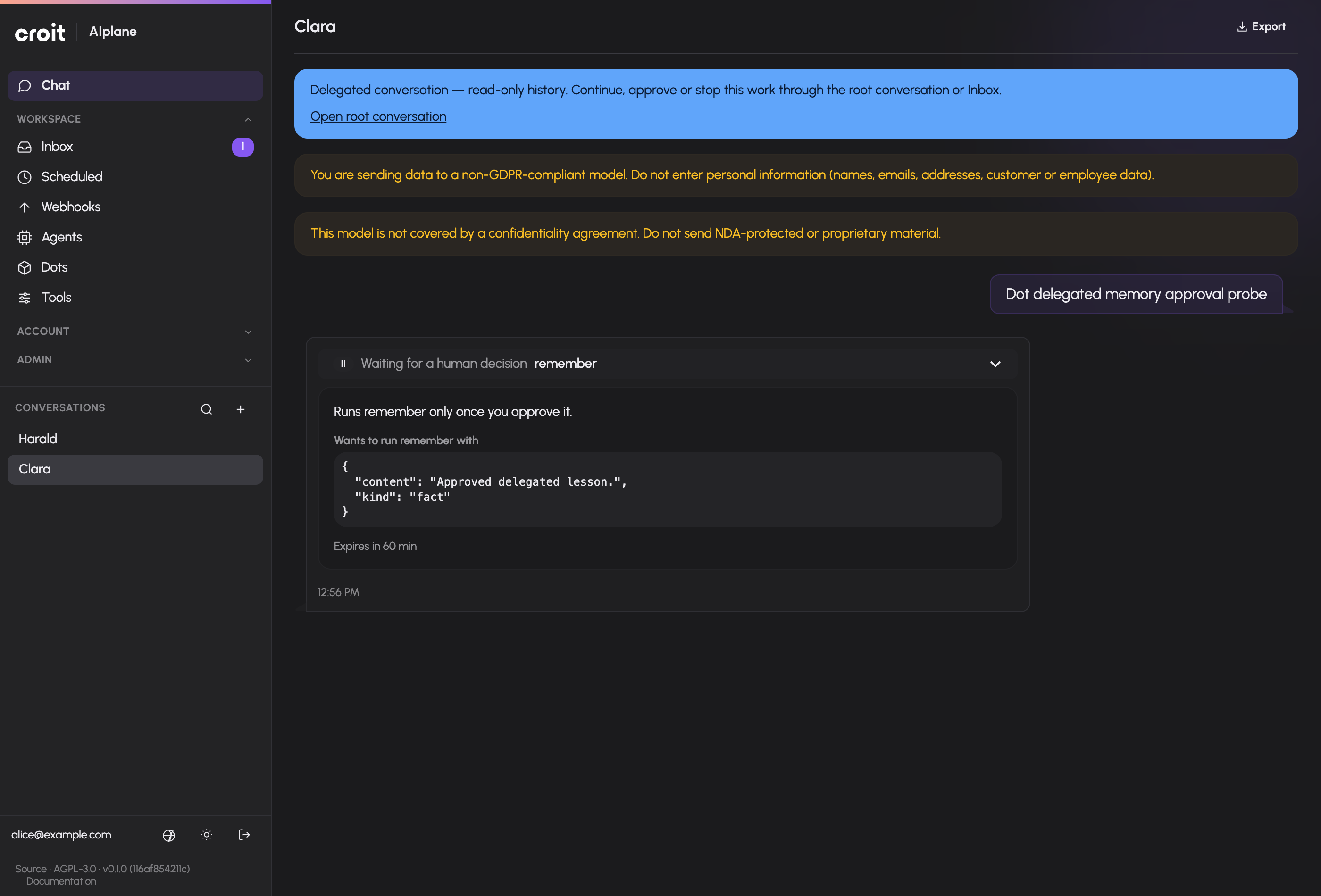
A delegated personal Dot conversation is private to its owner and remains read-only. Read its messages, inspect files or canvas documents, export it, or pin it in the sidebar. A suspended tool call shows Waiting for a human decision with a static pause indicator. Use Open root conversation or Inbox to continue, approve or stop the work. The child history cannot independently send messages, answer decisions, share, fork, edit, retry, delete or change tools and models.
Deleting the root cancels its linked work. Retained child histories remain private and read-only; when the root is unavailable, the banner explains that there is no root link.
Troubleshooting
If sending fails, the composer restores the submitted text and files and shows a notice. Read the notice before sending again. If a conversation is paused, answer its outstanding decision first. If another person already settled an approval, refresh the state rather than submitting an alternative decision.
Dictation, voice conversation and spoken replies count against your usage limits like messages do. Once a limit is reached, the voice controls show a notice that voice is paused and point you to Usage: a recording is not transcribed, and a reply in a voice conversation still appears as text in the transcript but is not spoken. A sentence the installation has spoken recently can still play, because it is replayed without a model call.
Model, transcription and speech-voice controls in the header are hidden below the small-screen breakpoint. Use a wider viewport when you need to change those settings.
Documentation build: 2610.1.108 · commit b774e1f9e2c2