Configure system features
Open Administration → Settings (/admin/settings) with the admin role. The categories are Chat, Tools, Data, Access, Notifications and Web search. Settings cards show the effective configuration from the server; model pickers use models available for the required pool kind.
Change a setting
- Choose the category and find the feature's card.
- Read its prerequisites and set its model, service URL or directory before enabling it.
- Save that card. Cards save independently.
- Check the success message and restart-pending banner.
- For restart-required fields, restart through your deployment's normal process and verify the feature afterwards.
Most fields reload without restart. The declared restart fields are comfyui.base_url, comfyui.content_dir, rag.enabled, rag.data_dir and rag.clone_concurrency. The UI also reports its pending list explicitly. A disabled feature does not become usable merely because its service URL is filled in.
Settings are stored in the database. Secrets are write-only: the UI shows whether one is set, not its plaintext. Where a stored secret is long enough for a fragment to be safe, the UI shows a head/tail fingerprint (for example tvly-…f99) so you can tell which key is stored. Leaving a secret input blank during Save preserves the stored value. Use its explicit Clear action, with confirmation, to remove it. Clearing a stored setting uses its built-in fallback; it does not re-import an arbitrary value from a configuration file.
Save validates typed settings before storing them. Invalid whole numbers, negative integer values, non-numeric or non-finite values, unlisted choice values, and IP-list entries that are not an address or a CIDR network show an inline error and leave the stored setting unchanged. Decimal settings accept either a period or a comma as the decimal separator.
The field reference lists every declared field and its meaning. The operating system's persistent paths and externally reachable services remain deployment responsibilities.
Chat and documents
- OCR: Select an OCR-pool model and configure document/page/output limits, resolution, timeout, concurrency and the text threshold used to identify scanned PDFs. This reads document text; it does not provision an OCR upstream.
- Compaction: Control when long conversation history is summarized, the assumed context window for unknown models, recent turns preserved verbatim, minimum conversation length and summary token budget. Verify model-specific context windows in the catalog.
- Parallel turns: Set how many different conversations a user may run simultaneously. The default is one.
- Loop retries: When a model collapses into repeating itself (repeated text, or the same tool call over and over), the call is stopped either way. This sets how often the answer is then tried again, one thinking level lower each time — default 2, at most 5, 0 to stop at the first loop. A level the model cannot express, or one that would send the same request again (OpenAI sends
highfor high and xhigh), is skipped; a model with no reasoning control, or a turn already at off, is not retried. The allowance is per answer, the attempts are counted per tool round: a loop in a later round, after an earlier one was retried, is that round's first attempt. A retry after a repeated tool call does not reset that call's count, so a tool with side effects runs no more often than without retries. Retries apply to chat turns and to scheduled and agent runs, which use the same driver. The stopped attempts stay visible, collapsed, in the answer; each is a metered model call (counting loops). - Attachments: Configure the S3 endpoint, region, bucket, key prefix and credentials in Data. Enable attachment storage only with a working bucket.
OCR uses the document-aware sidecar under deploy/ocr-sidecar through a dedicated ocr pool. The sidecar owns PDF rasterization and model inference; AIplane owns derivative caching, configured limits, queued/running/completed/failed state and usage accounting. OCR models are excluded from user-facing chat model lists. A generic chat endpoint is not sufficient for this internal multipart contract. Extracted text is treated as untrusted document content. Verify a scanned document and its page ordering after configuration.
Tools and data services
| Card | Configure before enabling | Where to check the result |
|---|---|---|
| Sandbox | Private sandbox-runner URL, deadline and returned-file size cap | A permitted code tool in chat |
| ComfyUI | Private worker URL, workflow directory and job limits | Workflow catalog and Jobs |
| Typst | Template directory available to AIplane | Document/PDF tools |
| GeoIP | IP2Location database path and optional update token | Location tool |
| RAG | Persistent index directory and indexing concurrency | Knowledge collections |
| Skills | Readable/writable bundle directory | Skill management |
Sandbox-runner and ComfyUI are privileged services. Their settings help explicitly requires making them reachable only from the gateway. Adding a service is separate from granting its tools to users and agents.
The sandbox gateway client sends code execution to the standalone runner; runner configuration enforces actual isolation, egress policy and resource caps. Generic code execution can reuse a working directory during one turn. Test stdout/stderr and an artifact with an allowed account. File delivery in browser chat also needs configured attachment storage. The gateway's sandbox.timeout_secs is an HTTP deadline, not a replacement for runner resource limits.
Typst rendering needs the typst executable on the AIplane process PATH. One subdirectory per template contains template.typ, template.toml and its local assets. The manifest defines the template's ID, title/description, input fields and output basename. A settings save rescans the configured template directory and rebuilds its tool surface. The renderer applies a 30-second compile timeout and a 25 MiB PDF size cap. Optional editable office exports use the sandbox. Verify the declared template inputs and rendered output before granting the typst_<id> tool family.
GeoIP reads an IP2Location LITE DB11 BIN file. Its optional token supports database updates; the file can be reloaded when changed. Client-IP location is approximate and fields may be missing. Browser-shared position is separate user-provided data. Behind a proxy, configure trusted proxy handling so the gateway uses the actual client address; a missing/private IP or unavailable database must not be interpreted as a precise location.
Moving the RAG data directory does not move existing indexes. Review persistent storage before changing it. A profile, credentials or an embedding model is configured on the collection, not on the global RAG card.
Access and content guard
The Usage card enables per-request accounting, retention and display currency. The Limits card enables enforcement of rules from /admin/limits. The Dots card sets dots.max_active_per_user, the maximum number of active personal Dots each user may own, including idle Dots; the clean-install default is four. The same card sets dots.max_active_per_organization, independently defaulting to four active Dots per organization, including idle Dots. It has no feature master switch. Administrators separately grant Personal Dot manager in the group form; the limit does not grant management rights. Lowering the cap does not deactivate existing Dots, but blocks new Dots or reactivation until the active count is below the new cap. Gateway settings control token/session lifetimes and impersonation. See access management.
Prometheus metrics
The Prometheus metrics card controls the GET /metrics scrape endpoint. It has three fields:
- Serve /metrics switches the endpoint on.
- Scrape token is the secret a scraper sends as
Authorization: Bearer <token>. It is write-only like every secret. - Allowed IPs lists the addresses and CIDR networks, such as
10.0.0.0/8, 2001:db8::/32, that a scrape must come from.
The endpoint answers only when it is switched on and at least one of the token and the IP list is set; otherwise it answers like a path that does not exist (404). With both set, a scrape must pass both. A client address outside the list gets 403; a missing or wrong token gets 401. Saved changes apply to the next scrape without a restart. Behind a reverse proxy, the IP list works only when AIPLANE_TRUSTED_PROXIES names the proxy; otherwise every scrape arrives from the proxy's address. The IP list guards only /metrics, not other gateway access. See monitoring for the scrape configuration and the metrics.
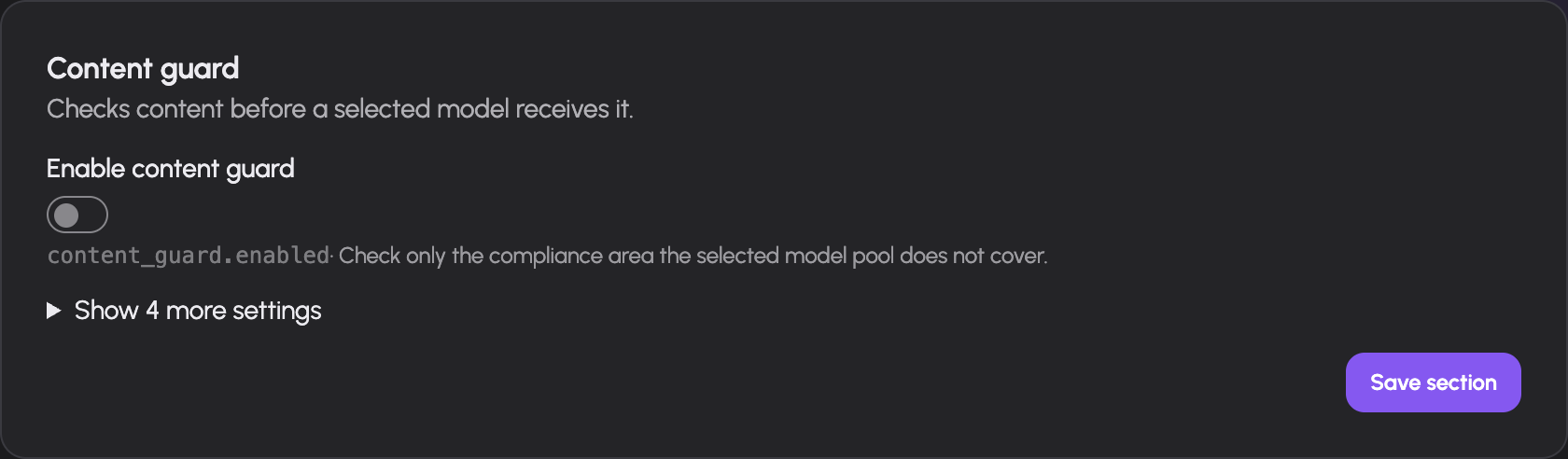
The content guard checks request messages for the compliance areas that the destination chat pool does not declare as covered. GDPR and NDA are independent checks. AIplane sends the request messages to the configured System One guard model, asking only about the uncovered area or areas:
| Destination pool declarations | Checks sent to the System One model |
|---|---|
| GDPR covered; NDA covered | Neither; the guard does not call its model |
| GDPR not covered; NDA covered | GDPR only: possible personal data |
| GDPR covered; NDA not covered | NDA only: possible confidential or NDA-protected information |
| Neither covered | Both GDPR and NDA |
The System One model receives the request messages being evaluated. Choose a guard model and pool whose own provider arrangement is suitable for processing that content; its model picker shows the same separate GDPR and NDA coverage indicators. The pool flags are operator declarations, not contract inspection or a compliance certification.
- Configure a reachable System One pool and model, and review the model's GDPR and NDA indicators for the content it will receive.
- Enable the guard and begin in Monitor mode. It records the checks and decisions but does not change request dispatch. If evaluation fails in monitor mode, the request proceeds and the failure is logged.
- Set the GDPR action and NDA action independently: Allow, Confirm or Deny. A matching classification reaches the action for that area; when both match, Deny takes precedence over Confirm, which takes precedence over Allow.
- Choose Enforce when the observed results and chosen actions are appropriate. In enforce mode, a guard evaluation failure returns an error and the destination model is not called.
The guard is asked after the caller's limits: a request refused because its user or token is over budget is never sent to the guard model. The classifier returns a score from 0 to 1 for each question; AIplane treats a score of 0.5 or higher as a match. The guard request has a five-second timeout. A confirmation in browser chat needs a connected prompt receiver and an affirmative answer within three minutes. API requests cannot display that browser prompt and return a content_confirmation_required error instead.
These checks use model classification and operator pool declarations. They are not verification of provider contracts or a guarantee that a classifier detects every sensitive passage. The declarations also do not establish legal compliance by themselves; operators remain responsible for evaluating provider terms and their organization's policies.
Notifications and feedback
Configure Feedback with the selected GitHub or GitLab tracker, its issue destination, credentials and labels. GitHub screenshot assets have a separate assets branch. Set the extraction and voice models when those feedback inputs are needed. Stored credentials remain write-only; switching the selected tracker leaves the other tracker's configured fields available.
Push settings enable browser push support and set the VAPID contact identity. Users still need to enable notifications in their own browser/settings. Agent Slack/Discord webhook channels are configured on the agent's Sharing screen, not on this global card.
Web search
The Web search category has its own provider card. Choose the provider, set the SearXNG URL or Brave API key as appropriate, and configure the optional Tavily settings. Existing API keys are preserved by blank inputs; use each clear-key control to remove one. Save and test a permitted search tool in chat. Selecting a provider does not grant the tool to users.
Troubleshooting
| Symptom | Check |
|---|---|
| Model menu empty | Backend health and correct pool kind |
| Feature enabled but unavailable | Feature prerequisites, process-readable directory and tool grants |
| Old worker or index path still in use | Restart-pending list and deployment restart |
| Secret seems blank | Set/unset indicator plus a head/tail fingerprint; write-only values are intentionally not returned in full |
| Content guard rejects everything | Guard service error, enforce mode and System One availability |
| Confirm action fails without a prompt | Connected browser chat versus API caller; three-minute deadline |
| New RAG path has no indexed data | Indexes do not move with a settings change |
Request prioritization
Under Access → Gateway, enable gateway.priority_enabled and choose gateway.default_priority (Low, Medium or High; initially Medium). Saved settings apply to new admissions. High-priority requests take the next available slot before Medium and Low; arrival order applies within each class. Sustained high traffic can cause lower classes to reach the existing upstream wait timeout. Running requests retain their slots. Assign group and token priorities in Access, and configure backend forwarding in Models and routing. See Request priority.
Documentation build: 2610.1.108 · commit b774e1f9e2c2