Connect models and control routing
An upstream backend is a model server or provider endpoint. A pool groups backends for a purpose such as chat, embeddings, reranking, transcription or OCR. The model catalog is the set of models and aliases exposed by that topology. Configure these before selecting models for chat, agents or optional features.
You need a signed-in account with the admin role. Open Administration → Models and routing (/admin/models). Its tabs are Upstreams, Catalog, Defaults and Automatic routing. /admin/upstreams also opens the upstream manager.
Add a backend and pool
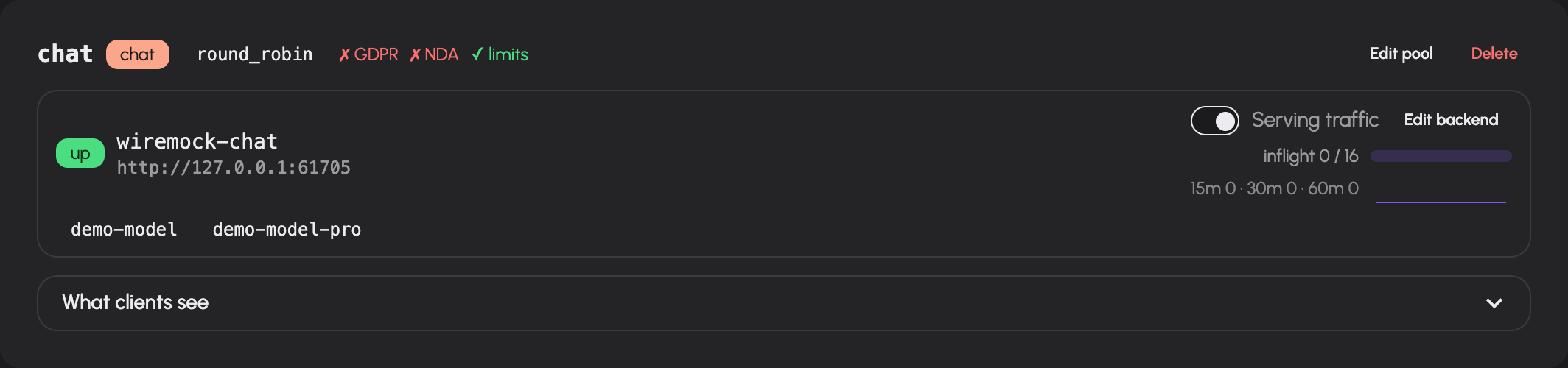
- In Upstreams, add a pool. Choose its name, kind and selection strategy. Set allowed groups and the GDPR/NDA declarations to match the actual provider arrangement.
- Add a backend. Enter a unique name and its API base URL. Select the pool. Configure a stored API key or an environment-variable key source if required.
- Use the backend's connection test. Read which credential source was used, the HTTP result and the discovered models. A connection test does not save or apply the backend.
- Set the health path, request weight and maximum in-flight requests. Configure explicit models when the upstream cannot advertise them, and aliases when clients need stable model names.
- Save the editor. Inspect the pending changes banner, then Apply the topology changes.
- Confirm that the backend reports healthy and that its models appear in Catalog.
The saved topology and the running topology are distinct. Editing a URL, pool membership or capacity does not complete the operation until pending changes have been applied. Live status updates show health, authentication failures, in-flight requests and advertised models.
Backend fields
| Field | Why configure it? |
|---|---|
| Base URL | Address of the upstream API, including its API prefix where required |
| API key / environment variable | Authentication for that upstream; a stored key is not displayed back as plaintext — only a head/tail fingerprint where the key is long enough for one |
| Health path | Endpoint used to check availability; the new-backend form proposes /models |
| Weight | Relative weighting used by strategies that consider weight |
| Maximum in-flight | Concurrent requests admitted to this backend; the form proposes 16 |
| Models | Explicit advertised model names |
| Aliases | Stable public name, optionally mapped to an upstream model using alias=target |
| Image editing support | Declares whether an image-generation backend can perform editing |
The connection test distinguishes authentication failure, timeout, unreachable server, other HTTP errors and a reachable endpoint that advertises no models. Fix the reported cause before applying. An environment-variable name is useful only when that variable is set in the running AIplane process.
Pool fields
Choose the pool's purpose from the kinds offered by the server. The editor also configures backend membership, explicit pool models, allowed groups, offline fallback, separate GDPR and NDA coverage declarations, and whether usage limits apply. Speech pools have language-to-voice mappings and an offered-voices list.
| Selection strategy | Behavior |
|---|---|
least_inflight |
Chooses based on current in-flight load; the new-pool form's default |
round_robin |
Distributes requests in rotation |
prefix_affinity |
Keeps matching request prefixes on the same replica where practical, while avoiding overloaded replicas; requests with no usable prefix fall back to least-in-flight selection |
The System One pool kind serves models for TypeSafe System One requests, including content checks and automatic-route selection. It is separate from the chat pool that receives the user's request; review both destinations' GDPR and NDA declarations when configuring those features.
The rerank pool kind serves cross-encoder models that score passages against a query. Knowledge search uses it, when one is configured, to reorder the candidates it found (knowledge collections). API clients call the same models through POST /v1/rerank, and /v1/models lists them. A rerank pool's allowed groups restrict which people's tokens may call or list its models; a pool without allowed groups is open to every token with default pool access. Knowledge search ignores those groups, because it calls the reranker as the gateway itself. POST /v1/rerank relays the request in the backend's own format; see the HTTP API reference.
Prefix affinity is useful for self-hosted replicas with separate prompt-prefix caches. It is separate from an automatic route's session affinity: one chooses a backend replica, the other retains a selected model target.
The GDPR and NDA flags describe separate properties of the provider arrangement. Set each one only when the applicable provider and service are covered for the data sent to that pool. These are operator declarations: AIplane does not inspect contracts, verify data residency, or certify compliance. The declarations are used by the content guard to decide which checks are needed before a request reaches a chat model. They do not grant access; allowed groups govern pool access, together with group permissions. Review an offline fallback's availability, coverage and user access before relying on it.
Backend and pool names can be changed through their editors. Deletion removes the configured resource; inspect and apply the resulting topology change. Do not overwrite another resource's name without reviewing the editor's explicit overwrite warning.
Use a backend card's serving toggle to drain or re-enable it. The toggle changes admission immediately; inspect the live in-flight count when draining for maintenance. The upstream manager also has a fallback per pool kind for unknown-model requests. Changing that fallback is live immediately and is distinct from a pool's offline fallback or a feature's default model.
Fallbacks and temporary outages
The three fallback choices answer different problems:
| Setting | Used when | Example |
|---|---|---|
| Unknown-model fallback for a pool kind | A request names a model that is not known to that kind | A client still asks for a model name that was removed or renamed |
| Offline fallback on a pool | The requested model is known, but no healthy backend in that pool can serve it | All replicas of a known model are restarting |
| Feature default | A feature needs a model and the caller did not select one | The configured default transcription model |
For a known model, AIplane skips unhealthy or drained backends and routes to a healthy sibling when one serves it. If no backend is available, it can hold the request and retry routing for the configured upstream-wait budget; the current default is 120 seconds. A backend connection failure or an upstream 502, 503 or 504 can also be retried against another eligible replica before any response has been sent. When the wait expires, API clients receive a retryable capacity error with Retry-After. An unknown model is not held waiting for capacity. An offline fallback can route around a complete pool outage immediately, so choose one only when its data-handling coverage and caller access are appropriate.
Configure a model
- Open Catalog. Search by model name or use the chat, other, aliases or configured filter.
- Open the model editor (
/admin/models/edit). - Set input/output prices in the unit shown for that model kind. Configure prices before treating monetary usage totals as complete. With a per-token price, embedding and rerank calls are charged at the input price; when a backend reports only a total token count, those tokens count as input. A rerank backend that reports no token usage (Text Embeddings Inference) or reports search units instead (Cohere) records its calls with no tokens and no cost; see reranking.
- For a chat model, verify its context window, reasoning format and capabilities against the upstream's actual configuration.
- Save. Return to the catalog and inspect the configured values.
Chat overrides include reasoning styles none, qwen, openai, glm, anthropic and ollama; token budgets or effort values for the low, medium, high and xhigh levels (off turns thinking off and has nothing to tune); vision, tools, structured output, audio input, PDF input and parallel tools; and fallback models for vision and tools. Capability fields distinguish unknown, enabled and disabled. Unknown is not proof of support. The vision fallback describes images returned by tools only when vision is explicitly Disabled; Unknown and Enabled leave the image unchanged. If describing an image fails, AIplane keeps the original image part.
Token budgets are offered only where they are enforced: always for Anthropic-style models, and for a Qwen-style model only when every backend serving it caps thinking per request — vLLM with its reasoning parser, or SGLang started with --enable-strict-thinking (see thinking budgets). Elsewhere a budget would be dropped without an error, so the fields are hidden. A budget must be at least 1024 tokens: an open-weight model cut off sooner tends to carry on thinking in its visible answer.
The context-window hint warns when an override exceeds the detected upstream window: AIplane cannot enlarge the upstream's actual context capacity. The TOML defaults field accepts model request defaults: flat keys are the sampling parameters (temperature, top_p, max_tokens, stop, …), and one level of table holds a provider extension parameter as a whole. The table is inserted into the request only when the client did not send that top-level key — a client value wins, there is no deep merge. OpenRouter's provider routing is the usual case:
[provider]
only = ["together"]
allow_fallbacks = false
sends the request to the Together serving of the model and never falls back to another provider. Clear overrides removes a chat model's overrides; non-chat model editors expose pricing only.
Set feature defaults
Open Defaults and choose the chat, transcription, speech, image or embedding default. The selection saves immediately. Clearing a selection removes the explicit feature default. Defaults choose from the existing model catalog; they do not add backends or grant access. If a feature has no suitable available model, fix its upstream pool before changing the default.
Create an automatic route
Use an automatic route when clients should request a stable alias and AIplane should choose among known chat models for each request.
- Open Automatic routing and add a route. The form requires an available selector and at least two candidate models.
- Set the alias, selector model and quality/balanced/cost objective.
- Give every candidate a unique key, a real model target and a description of its intended workload. These descriptions inform selection.
- Choose a fallback from the candidates. Set confidence threshold and selector timeout.
- Begin with Shadow rollout. Save and send representative requests to the alias. Inspect recent decisions.
- Select Active when those decisions meet your requirements.
The editor proposes confidence 0.7, timeout 1500 ms, shadow rollout, disabled session affinity and a one-hour affinity lifetime. Its timeout range is 100–30000 ms; affinity lifetime is 60–604800 seconds. Shadow records the selector's choice while using the fallback target. Active routing can select a candidate; low confidence or selector failure uses the fallback.
On the /v1 endpoints, usage limits apply to the selector model right before it is asked: a caller over budget on an enforced selector pool gets 429 without a selector call, while a selector on an exempt pool is still asked. A session-affinity hit asks no selector and is not checked on it. The target's limits are checked after selection, so a target refused by its own rule costs the selector call. See automatic routing.
The selector receives request content. Treat its provider as another processor of that content. Session affinity can retain a choice across related requests; it has an explicit lifetime. The decision table identifies route version, effective target, confidence, latency and outcomes such as selection, shadow, low confidence, selector error or affinity. Edit existing routes to revise their policy; delete a route only after checking its callers.
Troubleshooting
| Symptom | Check |
|---|---|
| Saved backend is not used | Pending changes and Apply |
| Authentication badge/error | Test's credential source, stored key and process environment |
| No models | Upstream model discovery, explicit model names, pool kind and health |
| Model missing for a user | Pool allowed groups and token model restrictions |
| Automatic route cannot be added | Available selector and at least two eligible candidate models |
| Route repeatedly uses fallback | Decision reason, confidence, selector timeout and candidate availability |
| Cost appears incomplete | Input/output price overrides and the Usage unpriced-model warning |
Backend priority forwarding
When saving a backend fails, the error receives keyboard focus and scrolls into view. Priority validation messages follow the selected UI language.
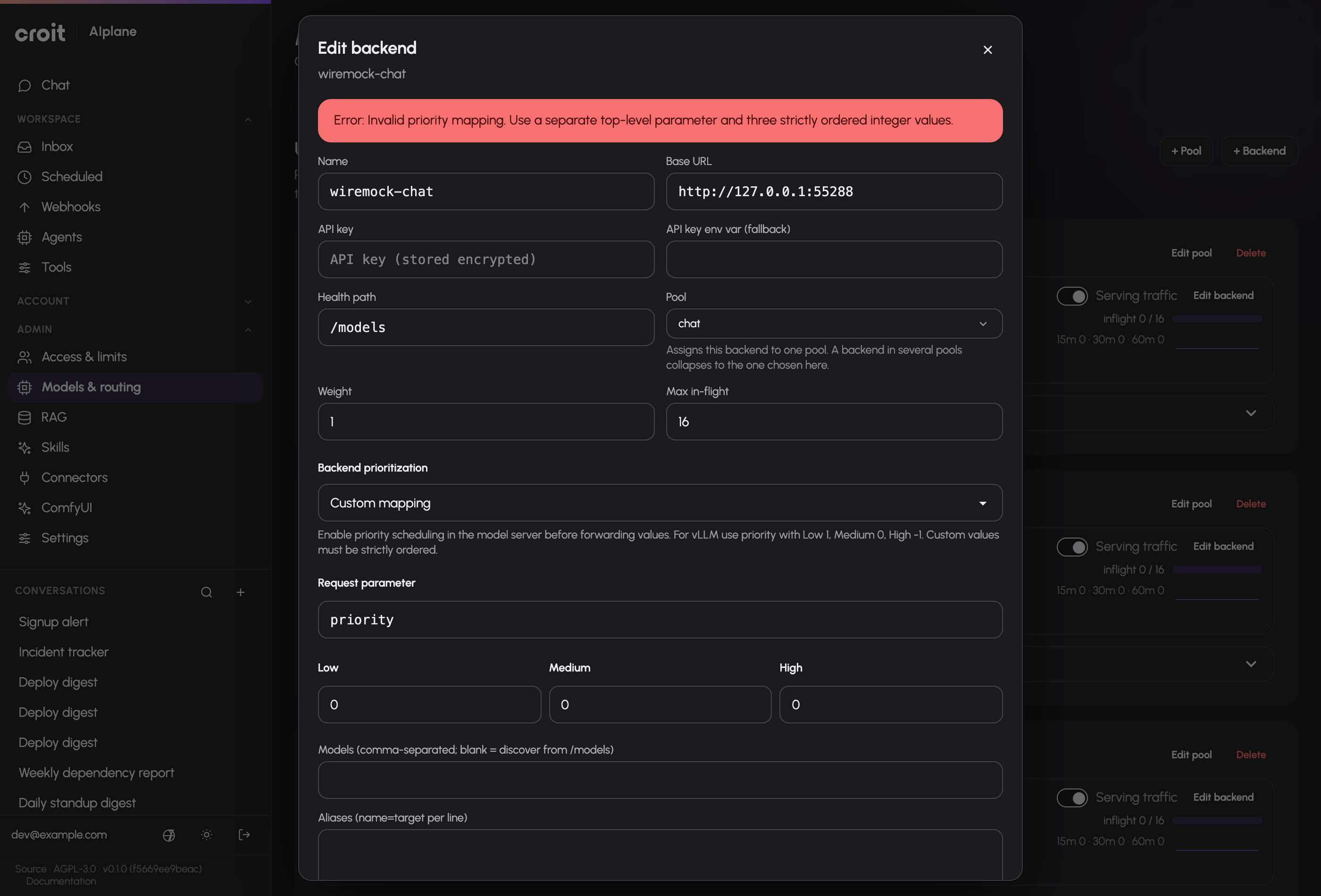
The backend editor offers Automatic, Gateway only, and Custom mapping. Automatic requires reported active scheduling, supported policy and integer ordering; otherwise the editor reports that forwarding is unreported. Gateway only uses AIplane’s queue. Custom mapping specifies a top-level request parameter and ordered Low/Medium/High integer values, overriding detection. For vLLM enable --scheduling-policy priority and map priority to 1/0/-1. For SGLang enable --enable-priority-scheduling with fcfs or lof; its direction can be reported by /server_info. Save and Apply. Software detection alone does not enable forwarding. Unsupported backends keep the same three gateway priority levels. See Request priority.
Documentation build: 2610.1.108 · commit b774e1f9e2c2