croit AIplane documentation
Connect your users and applications to models, tools, agents and company knowledge. This manual explains the current application, the permissions and services each capability needs, and how to operate it.
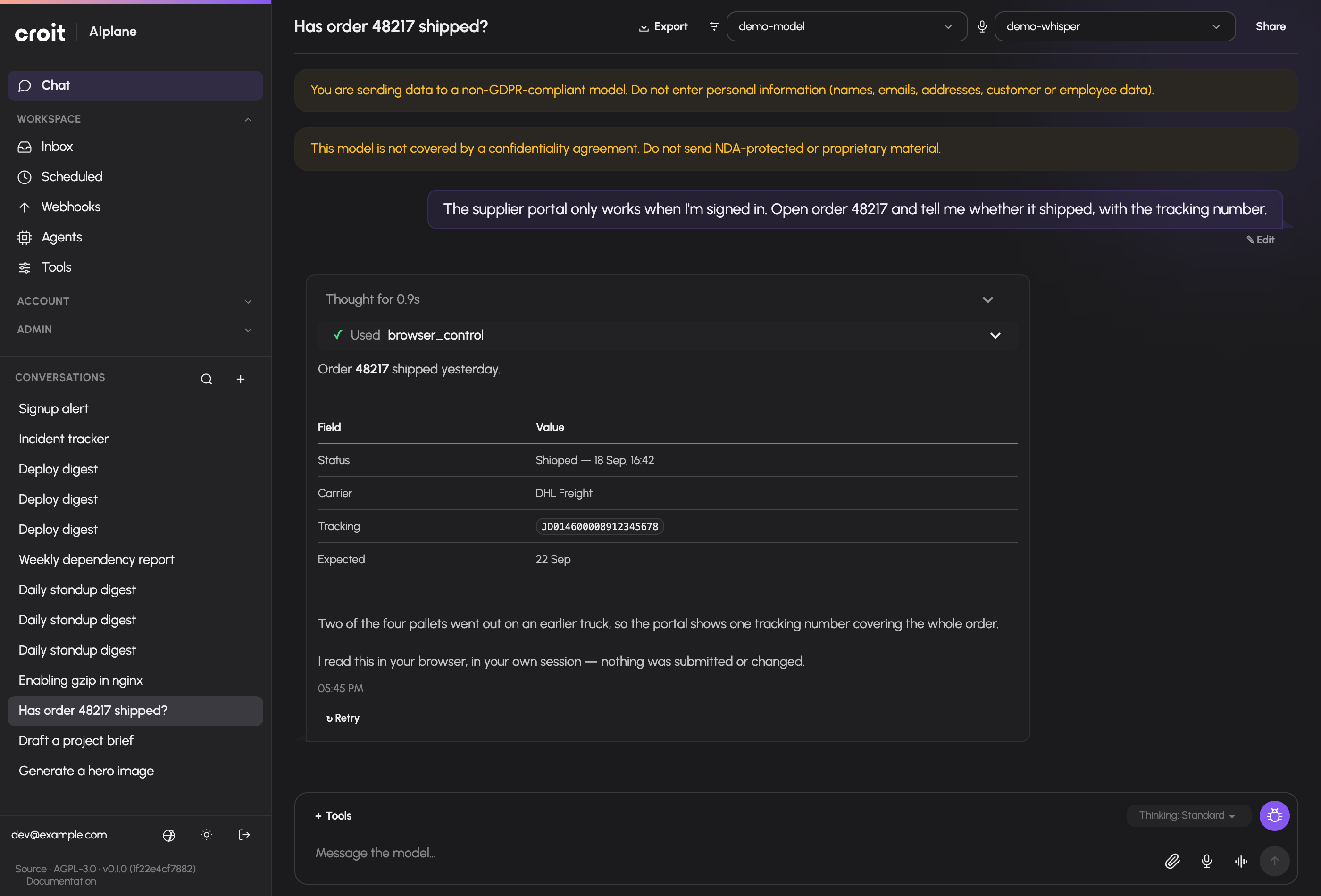
A conversation can combine a model response with an approved tool. This example uses synthetic demo data.
How AIplane fits together
AIplane connects people and applications to the models they are allowed to use, and gives those models access to approved tools and company knowledge. People can work in the chat interface; applications can use the OpenAI-compatible API. Models may run on your own infrastructure or come from a provider. Integrations and knowledge sources depend on what the installation has enabled and configured.
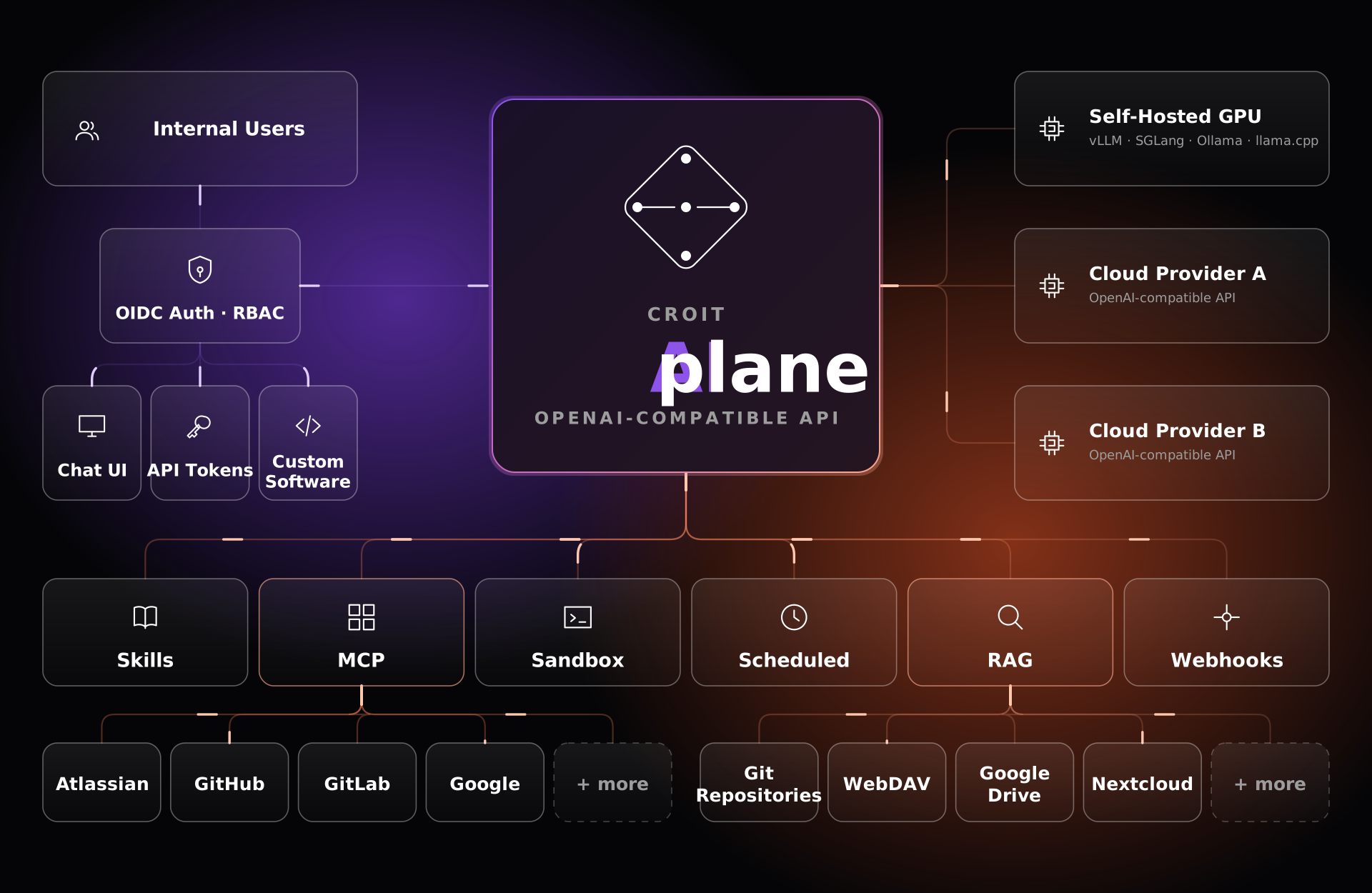
The diagram shows the main connections around AIplane. Available providers, integrations and features vary with each installation's configuration.
Start here
- Installing AIplane: Get started takes you from prerequisites through setup to your first chat and API request.
- Joining an existing installation: Start using AIplane.
- Operating a deployment: Deployment, backups and recovery, monitoring, and troubleshooting.
Use AIplane
| Task | Guide |
|---|---|
| Choose models, send messages, share, fork and export conversations | Conversations |
| Upload files, edit canvas documents, inspect versions and download results | Files and documents |
| Enable capabilities, connect your accounts, use browser control and skills | Tools and integrations |
| Manage preferences, tokens, notifications, usage and limits | Your account |
| Run prompts as the ordinary assistant or a personal Dot, trigger webhooks and respond to pending decisions | Automation and inbox |
Administer the installation
| Task | Guide |
|---|---|
| Connect upstreams, configure models, aliases and automatic routes | Models and routing |
| Manage users, groups, rights, tokens and limits | Access administration |
| Prioritize chat and API requests; configure backend scheduling | Request priority |
| Configure optional services and content policy | Operator settings |
| Look up every declared operator field | Settings reference |
| Configure connector catalogs, audit activity and global skills | Integrations |
| Index and maintain knowledge collections and extraction profiles | Knowledge |
Build and publish agents
- AIplane Dots: implemented personal behavior and product specification.
- Conversational Dot setup and chat participation: implemented personal setup and the design for organization setup, reconfiguration, guided connections and attributed Dot mentions.
- Personal Dot scheduled and event-driven work.
- Organization Dot webhooks: event-driven private runs with retained published versions, own identities, secret rotation and explicit replay.
- Personal Dot files and the workspace design: persistent file storage and Dot-owned browser profiles on supported runner deployments.
- Dot identities: personal and organization Dot-owned connector identities.
- Organization Dots: ownership, membership, configuration, own OAuth credentials, private conversations and pinned scheduled or event-driven work, with exact-turn Stop, writer-only Inbox decisions, isolated Dot notes and shared organization knowledge.
- Memory curation proposal: planned reviewed learning through existing scheduling and approval mechanisms.
- Personal Dot management permission: independent group rights through existing RBAC.
- Dot action rules: implemented permissions within
browse_pageandbrowser_control, with durable approval checks. - Dot communication: directed consent and implemented personal request/reply delegation.
- Cross-organization delegation: a personal Dot delegating to an organization Dot — consent, dispatch, the data boundary and durable waiting.
- Grok Bot comparison: researched capabilities, coverage and additional product gaps.
- Personal Dot browser handover: owner login assistance and exclusive control of a suspended Dot browser.
- Dot workflow teaching: generate a reviewed personal Skill draft from written workflow steps.
- Create an agent.
- Configure permissions.
- Test and publish.
- Observe runs and handle decisions.
Reference
- HTTP API: model protocols, authentication and accepted endpoints.
- Environment and process.
- Tool inventory: tool IDs, availability gates and dynamic families.
- Stable identifiers: names that identify existing storage and are shared with separately updated clients.
- Documentation website and LLM exports: where to read or download this build's documentation.
Read with a language model
The built website contains llms.txt, llms-full.txt, and a markdown/
directory with the published source pages. In an installation these are
under /docs/; the public website carries the same formats. See
export details for paths and build identity.
The manual uses the application's actual behaviour. Optional capabilities require their configured services and grants; screenshots use synthetic data from the real application, including prerequisites, permissions and limits.
Documentation build: 2610.1.108 · commit b774e1f9e2c2